
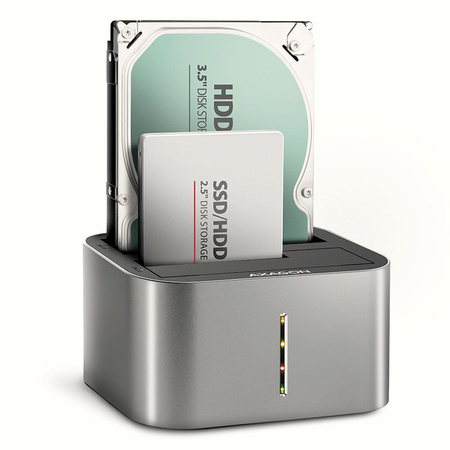
SSD ACC DOCK STATION USB-C/2.5"/3.5" SATA ADSA-DC AXAGON

SSD ACC DOCK STATION USB-C/2.5"/3.5" SATA ADSA-DC AXAGON

164,00 zł

incl. VAT / 1szt.
Lowest price in 30 days before discount: / szt.
Regular price: / szt.
Cena sugerowana:164,00 zł
You can buy for pts.
of
You can also buy using:
Contact the shop staff, in order to estimate time of preparing this product for shipment.
Shipment
14 days for easy returns
This product is not available in a stationary store
Safe shopping
Deferred Payments. Buy now, pay later, if you don't return it
Buy now, pay later - 4 steps
When choosing a payment method, select PayPo.PayPo - buy now, pay later
PayPo will pay your bill in the store.
On the PayPo website, verify your information and enter your social security number.
After receiving your purchase, you decide what suits you and what doesn't. You can return part or all of your order - then the amount payable to PayPo will also be reduced.
Within 30 days of purchase, you pay PayPo for your purchases at no additional cost. If you wish, you spread your payment over installments.
After purchase you will receive pts.

ADSA-DC SuperSpeed USB DUAL 2.5"/3.5" HDD/SSD DUAL dock

Dual USB-C 5Gbps docking station for up to two 2.5"/3.5" SATA HDD/SSD.

SuperSpeed USB-C 5Gbps docking / cloning station AXAGON ADSA-DC DUAL CLONE easily and quickly connects up to two 2.5" or 3.5" drives to the computer at the same time. The connection to the computer is enabled by the modern double-sided USB-C connector on the dock together with the supplied USB-C <-> USB-A cable with a length of 80 cm.

This handy helper will allow you easiest connection of any 2.5”/3.5" SATA drive to computer or notebook. Just insert one or even two disks into the base at the same time, no tools or accessories are needed. Changing disks is very quick and easy.

You can use the docking station to easy cloning the contents of connected disks without the need to connect to a PC. Insert the source disk into the first slot of the station HDD A (source) and insert the target disk into the second slot HDD B (target). Then you just press the clone button and watch the cloning process on a scale of four LEDs. After all the data has been copied, there is an exact copy of the original disk on the destination disk. The dock can thus be used as an autonomous device for convenient duplication and disk image creation. This is the easiest way to transfer the contents of old HDD to new SSD, including a working operating system (Windows, macOS, Linux...).

SATA 6G interface with UASP support allows you to enjoy the speed of modern SSD disks. The TRIM feature support limits the gradual degradation of SSD performance over time. Reading of S.M.A.R.T. information monitoring the SSD/HDD condition. Supports sleeping of the connected disks and station.

The station case is sufficiently robust and durable, which allows perfect stability even with inserted disks. Rubber anti-slip pads prevent sliding on the table and vibrations of the hard drives. The outer casing is made of aluminum with an elegant brushed surface. 

Brand
Symbol
ADSA-DC
Producer code
8595247907707
Kategoria ELKO
Akcesoria do dysków
Kod kategorii ELKO
HDA
Kod producenta ELKO
5A
Kod CN
84733080
Ilość w opakowaniu
1
12
Dostępni przewoźnicy
DPD, InPost, Omniva
Kolor
Szary
Category Code
HDA
CnCode
84733080
Unit Box Height
0.09
Unit Box Length
0.16
Unit Box Width
0.22
DDR3 1600/1333/1066/800
ADSA-DC
Wymiary
73 x 130 x 97 mm
PCI-Express 3.0 16x
0
Objętność brutto
0.003626 cubm
Jednostkowa waga netto
0.307 kg
Jednostkowa waga brutto
0.708 kg
Do you need help? Do you have any questions?Ask a question and we'll respond promptly, publishing the most interesting questions and answers for others.
Ask a question
If this description is not sufficient, please send us a question to this product. We will reply as soon as possible. Data is processed in accordance with the privacy policy. By submitting data, you accept privacy policy provisions.
Write your opinion
Your opinion:
5/5
Add your own product photo:

We care about your privacy

This page uses cookie files to provide its services in accordance to Cookies Usage Policy. You can determine conditions of storing or access to cookie files in your web browser. More information on terms and conditions and privacy can also be found on Google's Privacy and Terms page.

Close
pixel